
Teachers can customize templates to use with students.
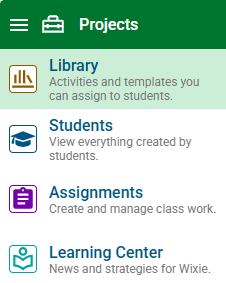
Click the main menu and choose Library.

Click the Customize button on the toolbar.

The template will be copied to your projects and you will be editing this copy.
Make any changes you want to the template.
Click the File menu and choose Assign.
You will see a dialog that will allow you to assign the activity to a class or individual students.
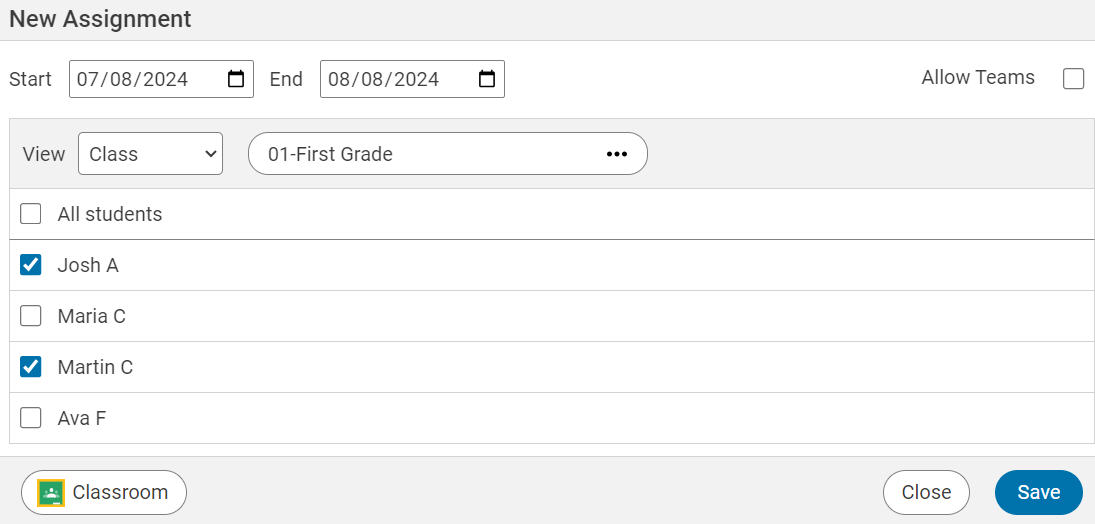
Click the Start Date to select the first day you want students to see the activity in Wixie.
Click the End Date to select the last day you want students to see the activity in Wixie.
Use the Class pull-down menu to select the class of students you want to view.
If you want every student in the class to see the activity, click the All students check box.
If you only want individual students to see the activity, click the check box for each student.
When you are finished choosing students, click the Save button.
The students you selected will see the activity on the dates you specified.
Click the Home button to edit another project.